Governance First: Open Source LLM Gateway, Audit Trails & Token Costs

An open-source LLM gateway is a unified API and control plane that routes and governs requests across multiple language model backends. Adopt one once you're calling more than one provider or model and need consistent routing, cost tracking, and centralized observability instead of scattered SDK calls. If governance and traceability matter to your team, an AI Gateway with strong open-source features is worth putting at the top of your shortlist.
TL;DR:
- An open-source LLM gateway handles multiple models with a unified API, routing requests and tracking tokens without requiring SDK rewrites.
- Essential infrastructure features include load balancing, failover, traffic control, and routing strategies, especially for high traffic and failure resilience.
- Security and governance rely on virtual API keys, audit logs, and policy enforcement to operate effectively in regulated environments.
- Successful deployment involves staged testing with canary routing, latency monitoring, and incident planning, prioritizing observability over simple routing.
- Integration with MLflow provides centralized audit trails, prompt versioning, and telemetry, facilitating compliant, manageable AI model orchestration.
Table of Contents
- What Does an Open Source LLM Gateway Actually Do?
- Which Infrastructure Features Actually Matter in Production?
- Self-Hosted, Hosted, or Hybrid: Which Deployment Fits?
- How Do You Secure and Govern Gateway Traffic?
- What Should Your Evaluation Checklist Look Like?
- What Does a Working Rollout Look Like End to End?
- Lessons From Deploying Gateways at Scale
- Where MLflow Fits Into Your Gateway Checklist
- Sources
What Does an Open Source LLM Gateway Actually Do?
Strip away the marketing and a gateway does three jobs: it presents one API surface, it decides where a request goes, and it keeps a record of what happened. Every open-source implementation worth evaluating builds on those three functions.
The most practical design decision a gateway makes is exposing an OpenAI-compatible façade. Your application code calls /v1/chat/completions the same way whether the request lands on GPT class models, Anthropic's Claude, or a self-hosted open-weight model like gpt-oss. That compatibility matters because it means you don't rewrite SDK integrations every time you swap a provider or add a fallback model. The gateway handles provider-specific authentication, request shaping, and response normalization behind that consistent contract.
Beyond the façade, a gateway typically handles:
- Model routing — directing a request to the correct backend based on the model name, a routing policy, or load conditions.
- Key management — storing and rotating provider credentials so application code never touches raw API keys.
- Token accounting — logging input and output tokens per request for cost attribution and budgeting.
- Streaming support — passing server-sent events or chunked responses through without breaking the client's expectation of incremental output, a detail rooted in how streaming semantics are defined at the protocol level.
- Function-calling compatibility — preserving tool-call schemas so agents built against one provider's function-calling format keep working when routed elsewhere.
That last point trips up more migrations than teams expect. An agent framework that depends on structured tool calls will break silently if the gateway normalizes function-calling payloads inconsistently across providers.
Which Infrastructure Features Actually Matter in Production?
A gateway that works in a demo and a gateway that survives a traffic spike are different animals. Before you commit to one, verify it handles the boring infrastructure work that becomes very not boring at 2 a.m.
Start with load balancing and failover. A gateway should distribute requests across multiple API keys or backend instances, run health checks against each one, and automatically fail over when a provider returns errors or times out. Pair that with token-based rate limiting so one team's runaway batch job doesn't exhaust the shared quota for everyone else. Apache APISIX's open-source AI gateway plugins are a useful reference point here. They bundle authentication, traffic control, load balancing, fallback, and token controls as standard, expected capabilities, not premium add-ons.
Routing strategy is where gateways start to diverge. Simple prefix-based routing, where the model name in the request maps directly to a backend, is fast and predictable but brittle when clients omit the model field or when you want cost-aware routing. Semantic routing goes further, using a cascade of heuristics, embedding similarity, and sometimes a lightweight classifier to pick the right model automatically. It's a genuinely useful pattern for multi-model fleets, but it comes with a cost.
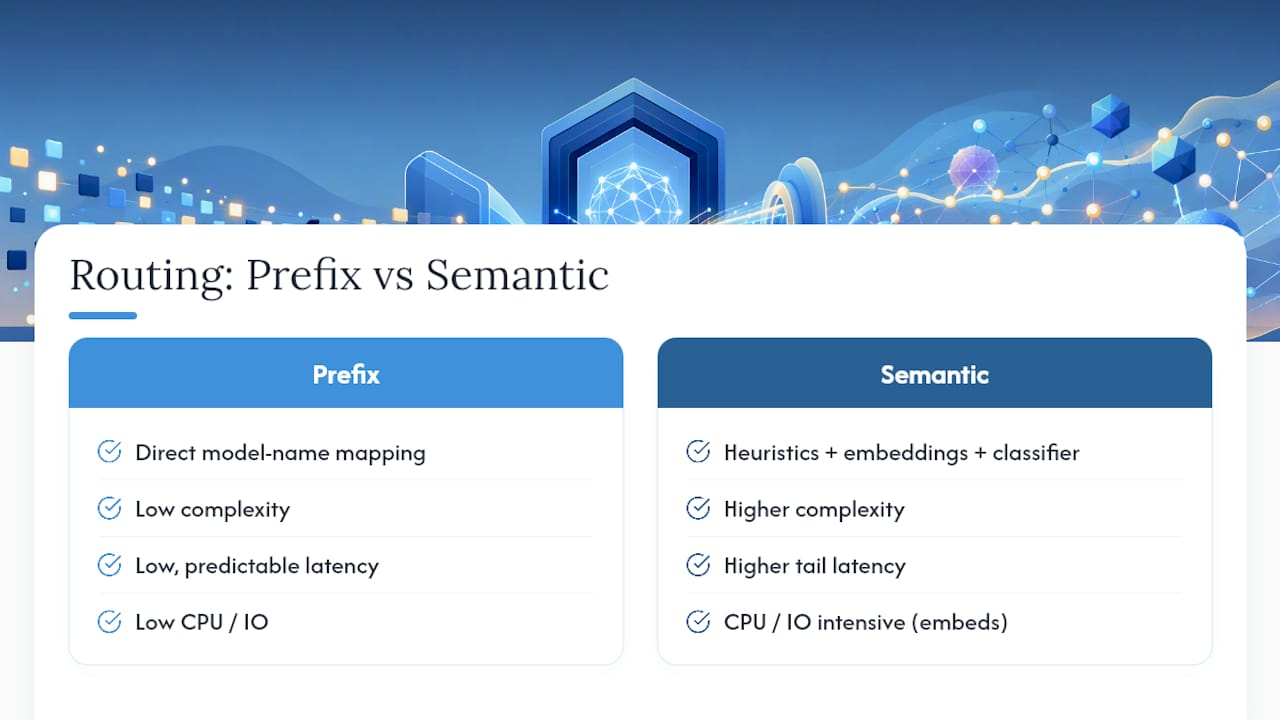
Embedding-based routing checks can be CPU and IO intensive, so teams building semantic routing layers should load-test the added latency against tail-latency budgets before trusting it in a hot path. Teams building semantic routing layers should load-test the added latency against tail-latency budgets before trusting it in a hot path, since the accuracy gains can be offset by slower P99 response times.
Observability primitives close the loop: request-level metrics, distributed tracing, and per-token cost data feed directly into whatever SLA or SLO your team commits to internally.
Self-Hosted, Hosted, or Hybrid: Which Deployment Fits?
The self-hosted versus hosted decision comes down to three variables: how much control you need, how sensitive your latency budget is, and what compliance obligations you're carrying.
Self-hosting a gateway puts it inside your own network perimeter, which matters if you're routing requests to on-prem inference or handling regulated data that can't cross a third-party boundary. You take on operational ownership: patching, scaling, and uptime become your problem. Hosted gateways trade that control for convenience. Platforms that aggregate hundreds of models behind a single REST API show how fast experimentation can move when someone else runs the infrastructure, but you inherit their latency, their outages, and their data-handling terms.
Most production teams land on a hybrid: a self-hosted gateway at the edge of their VPC, routing some traffic to cloud provider APIs and some to backends they control directly.
Connecting to self-hosted inference backends generally follows one of these patterns:
- vLLM or TGI backend — the gateway sends OpenAI-compatible requests to a vLLM server running an open-weight model. OpenAI's own gpt-oss models are designed to be served this way, and multi-framework projects like Qwen3 document vLLM, SGLang, and TensorRT-LLM as supported serving options.
- Cloud provider API — the gateway proxies to a managed endpoint, handling auth translation so your app code never sees the provider's native credential format.
- Zero-trust overlay — for air-gapped or multi-cloud setups, an overlay network lets the gateway reach inference nodes without opening inbound ports, which keeps health checks working across NAT boundaries.
Pro Tip: If you're air-gapped or running across multiple cloud accounts, test your zero-trust overlay's health check latency before you assume failover will trigger fast enough to matter.
How Do You Secure and Govern Gateway Traffic?
Security on a gateway isn't a bolt-on. It's the difference between a routing tool and something you can actually run in a regulated environment.
Identity-based access control is the foundation. Instead of one shared API key floating around every service, a gateway should issue virtual keys scoped to a team, project, or environment, each carrying its own rate limits and model permissions. That scoping is what lets you enforce policy without micromanaging every request.
Centralized audit logging is the second pillar. Every prompt, every response, every routing decision should land somewhere queryable, both for debugging a bad output and for satisfying a compliance review months later.
Gateways are quietly turning into governance and compliance layers rather than pure routers. Identity-based access controls paired with centralized audit trails close a visibility gap that used to require stitching together logs from five different provider dashboards.
The capabilities to look for on a checklist:
- Virtual API keys with per-team or per-project scoping.
- Immutable audit trails covering prompts, responses, and routing metadata.
- A prompt registry with version history, so you can trace which prompt version produced a given output.
- Automated evaluation, such as an LLM-as-a-Judge workflow, wired into the same telemetry pipeline.
- Moderation and policy enforcement at the request layer, not left to each provider's own filters.
Apache APISIX's plugin ecosystem again illustrates the baseline: moderation, prompt policies, and auditing are treated as core gateway functions, not enterprise upsells bolted on later.
What Should Your Evaluation Checklist Look Like?
Picking a gateway on vibes is how teams end up migrating twice. Run through a structured checklist before committing engineering time to any single option.
- Confirm API compatibility. Does it expose an OpenAI-compatible endpoint with full streaming and function-calling support, or will your SDK integrations need rewrites?
- Verify failover behavior. Kill a backend mid-test and confirm requests reroute without dropped connections.
- Check cost tracking granularity. Can you attribute token spend to a team, project, or individual request?
- Audit the license. Confirm it's genuinely permissive for your use case, not a source-available license with commercial restrictions.
- Look at release cadence and community activity. A gateway with no commits in six months is a liability, not a foundation.
- Review security disclosure history. How fast did maintainers patch the last reported vulnerability?
Once the checklist clears, run a proof of concept with a real testing plan: a smoke test to confirm basic routing, a load test to find your latency ceiling, and a failover drill to confirm the reliability claims actually hold.
| Metric to track during POC | Why it matters |
|---|---|
| P99 latency under load | Reveals overhead the gateway adds versus calling providers directly |
| Failover recovery time | Confirms health checks and rerouting actually work under failure |
| Cost per request | Establishes a baseline before scaling traffic |
| Token accounting accuracy | Validates that billing data matches provider invoices |
What Does a Working Rollout Look Like End to End?
A reference architecture for most teams looks the same regardless of which gateway you pick: your application layer sends requests to the gateway, the gateway consults a secrets store for credentials, routes to one or more inference backends (self-hosted vLLM instances, cloud provider APIs, or both), and streams telemetry to an observability stack for tracing and cost accounting.
Rolling that out safely follows a predictable sequence:
- Run a local proof of concept with two backends, one hosted and one self-hosted, using weighted canary routing to validate both correctness and failover before adding anything more complex.
- Move to an internal beta with a small set of real traffic, watching latency and error rates closely.
- Shift to canary routing in production, sending a small percentage of live traffic through the new gateway while the rest stays on the old path.
- Cut over fully once error budgets and latency numbers hold steady across a full traffic cycle, including peak load.
Pro Tip: Wire token-cost alarms into your incident response plan from day one. A misconfigured routing rule that silently sends everything to your most expensive model is a cost incident, not just a technical one, and it often goes unnoticed until the invoice arrives.
Keep a runbook item for routing failures specifically: what alert fires, who gets paged, and what the rollback path looks like if a new backend starts failing health checks.
Lessons From Deploying Gateways at Scale
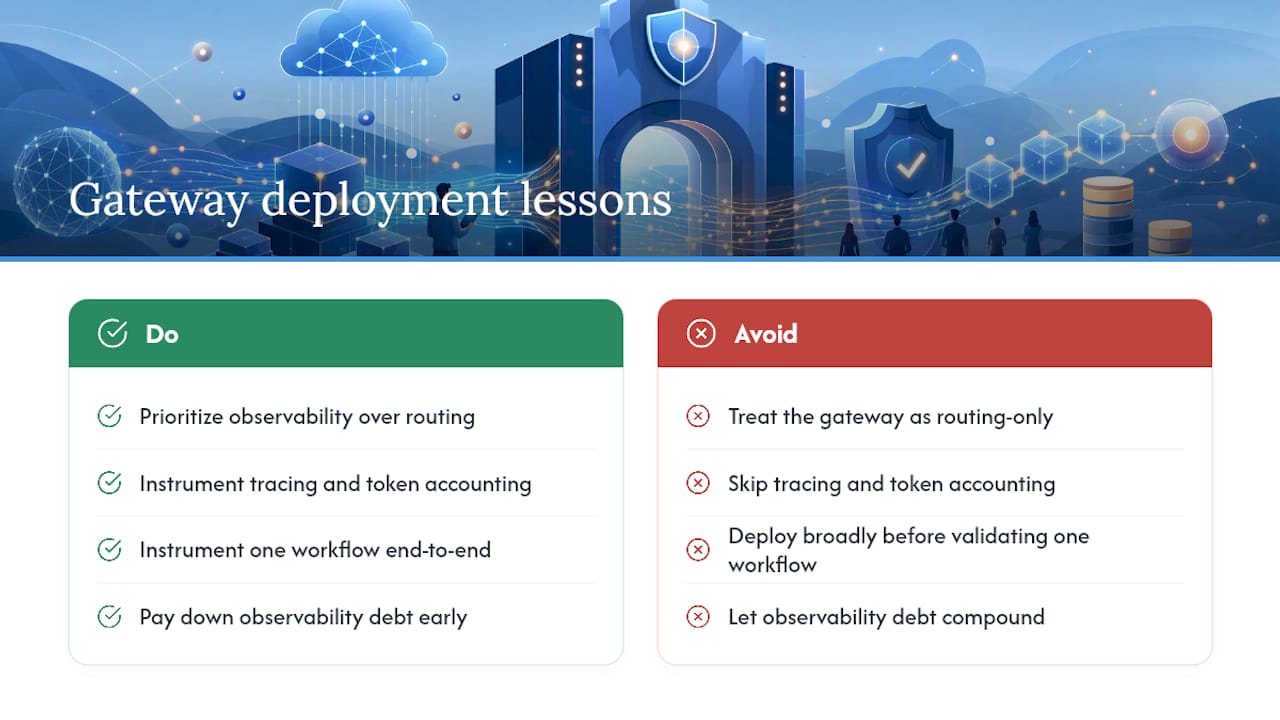
The most common blind spot we see is teams treating the gateway as a routing problem when it's actually an observability problem wearing a routing costume. Get the tracing and token accounting right first, and the routing logic mostly takes care of itself. Skip that step, and you'll spend months debugging cost spikes and latency regressions with no data to work from.
The practical next step for most engineering teams is smaller than it sounds: instrument one workflow end to end before expanding to the rest of your stack. Observability debt compounds fast, and paying it down early is far cheaper than untangling it after three teams depend on an opaque pipeline.
— Kevin
Where MLflow Fits Into Your Gateway Checklist
Everything on that evaluation checklist, from virtual API keys to prompt versioning to failover testing, maps directly onto what the MLflow AI Gateway was built to handle. It gives you a governed, OpenAI-compatible entry point across providers with centralized audit trails, so the audit logging pillar from the security section isn't something you bolt on later.
Pair the gateway with MLflow's prompt registry to version and track prompts the way you'd version code, and layer in LLM-as-a-Judge evaluation to catch quality regressions before they reach production traffic. If token cost accounting is your biggest gap right now, the AI observability tooling gives you the per-request telemetry that most self-built routing scripts never capture. For a side-by-side check on how routing decisions affect output quality across models, a tool like BabyLoveGrowth's multi-LLM audit can help you compare responses before you commit to a routing policy. Start with the MLflow AI Gateway quickstart and get one workflow instrumented this week.