Your Agents Need an AI Platform

Agent frameworks like LangGraph, OpenAI Agents SDK, and Vercel AI SDK make it easy to build an initial version of an agent. The hard part is making it work reliably in production: agents can break down in ways that are impossible to catch by vibe-checking a prototype.
Consider a customer support agent that looks up order status, processes refunds, and searches your knowledge base. You wire it up, test it on a handful of questions, and it works. Ship it. Then a customer asks for a refund on an order that doesn't exist, and the agent hallucinates a confirmation number. The wrong customer's home address shows up in a response due to a lack of data access controls. A model provider pushes an update, and refund success rate quietly drops from 94% to 71%. A retry loop goes haywire overnight and you wake up to a $12,000 invoice. The agent framework got you to version one. It won't get you to reliability.
Some teams try to solve these problems by stitching together separate tools for tracing, evaluation, prompt management, and LLM access control. But the tools don't share data, creating duplication and silos, and the integration tax grows with each one you add.
For your agents to thrive in production, you need an integrated AI platform with all of the following capabilities:
- Observability: full visibility into what your agent is doing, step by step
- Evaluation: reproducible quality measurement across every dimension you care about
- Version control: versioned prompts and configurations that can be compared, optimized, and rolled back
- Governance: centralized control over LLM calls, data access, and costs
This article walks through why each one matters and how MLflow brings them together in a unified open source platform.
MLflow is the only open source AI platform that provides unified agent observability, evaluation, version control, and governance.
Observability: You Can't Debug What You Can't See
Your agent processes 2,000 support tickets a day. A customer complains that the agent told them their refund was processed, but it wasn't. What happened?
Maybe the tool call failed silently. Maybe the LLM hallucinated the confirmation. Maybe the retrieval step pulled the wrong knowledge base article. Maybe the agent called the right tool with the wrong parameters. How do you know? Without observability, all you can do is guess from the final response.
AI platforms provide observability through tracing: a system that records every step your agent takes, so you can replay and inspect any request after the fact. As we'll see, tracing also makes the rest of the platform work: evaluation, version control, and governance all depend on having full visibility into what your agent is doing.
import mlflow

# One line instruments your entire agent
mlflow.openai.autolog()

def handle_ticket(ticket):
    return client.responses.create(
        model="gpt-5",
        input=ticket,
        tools=[
            lookup_order,
            process_refund,
            search_knowledge_base,
        ],
    )
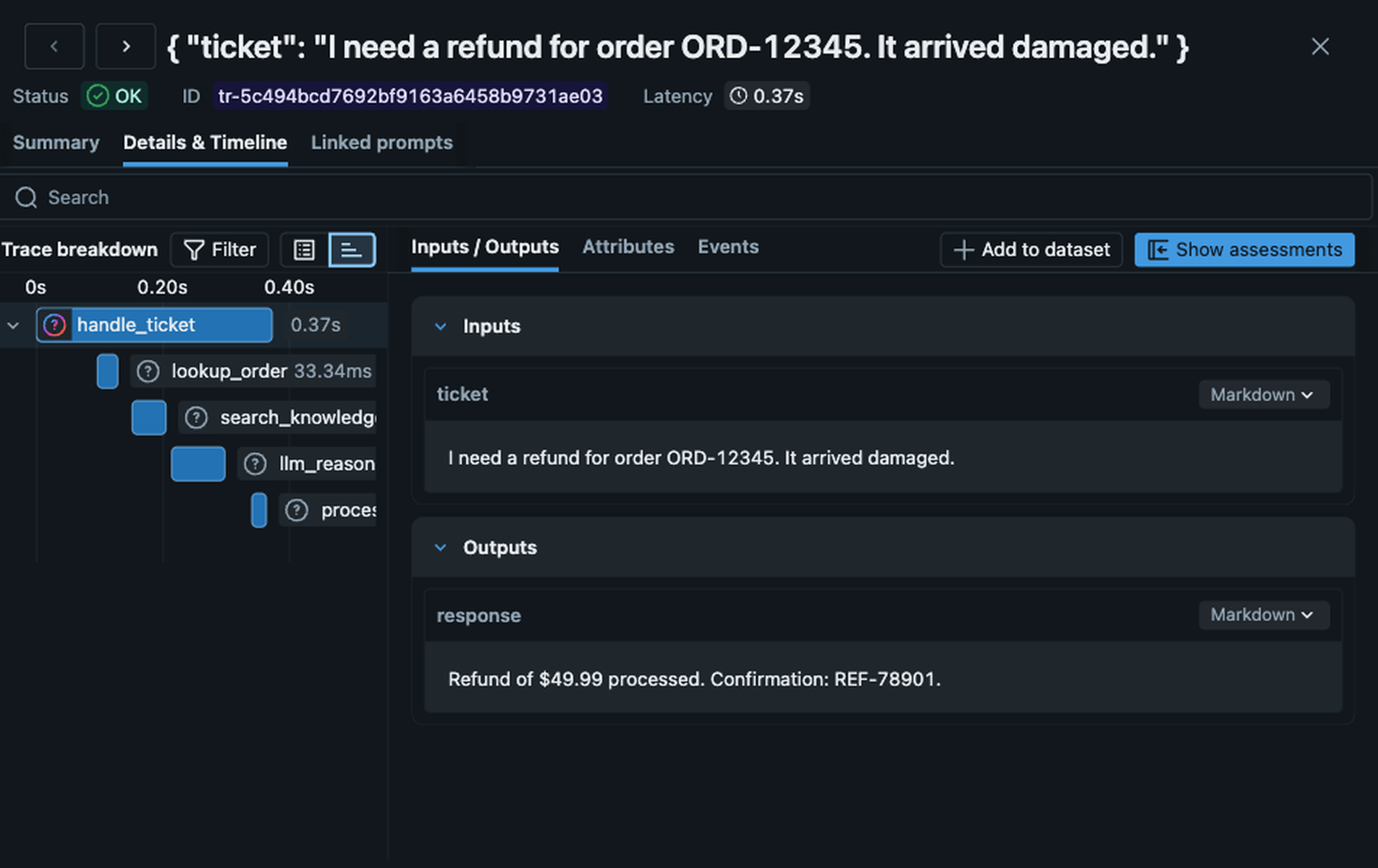
lookup_order returned an error the LLM ignored, and fix the problem in minutes.MLflow offers a comprehensive tracing framework that captures the full execution graph of every agent interaction: every LLM call, every tool invocation, every retrieval step, even your custom functions, with inputs, outputs, token counts, and latency. MLflow Tracing is OpenTelemetry-compatible, so it works with any programming language, any agent framework, and any LLM provider. MLflow also offers one-line automatic tracing for more than 30 popular frameworks and providers (LangGraph, OpenAI Agents SDK, CrewAI, AutoGen, Pydantic AI, Google ADK, and many more) that instruments your entire application automatically with just a single line of code.
Evaluation: Prove Your Agent Works Before You Ship It
Your customer support agent handles refunds, answers product questions, and looks up order status. Before you deploy it, how do you know it performs well enough? And after it's in production, how do you know it's still working well? You can't manually sift through thousands of traces looking for problems. Every change you push risks breaking something that goes undetected because most users don't provide detailed feedback, they just stop using your product. And while it is possible to vibe check that a change in your agent fixes a specific problem, how do you verify that it doesn't cause regressions for other requests?
AI platforms solve this with an evaluation framework: a system that automatically scores your agent's outputs using defined criteria, both before deployment and continuously in production. Think of it like the Swiss Cheese model: each layer has holes, but stack them together and problems can't slip through.
- Deterministic tests catch obvious breakages: did the agent call the right tool? Did the refund amount match the order total? Fast and cheap, but they can't tell you whether an answer actually made sense.
- LLM judges score outputs on dimensions like correctness, safety, and relevance, covering the qualitative criteria that deterministic tests can't.
- Human feedback is the final layer. Domain experts catch subtle issues that neither code nor models reliably detect, and calibrate LLM judges to make sure they're scoring the way your team would.
No single layer is enough. Stack all three and you have coverage that scales.
import mlflow
from mlflow.genai.scorers import (
    Safety,
    Correctness,
    ToolCallCorrectness,
)

# Evaluate your agent against a dataset
results = mlflow.genai.evaluate(
    data=support_tickets_dataset,
    predict_fn=handle_ticket,
    scorers=[
        Safety(),
        Correctness(),
        ToolCallCorrectness(),
    ],
)
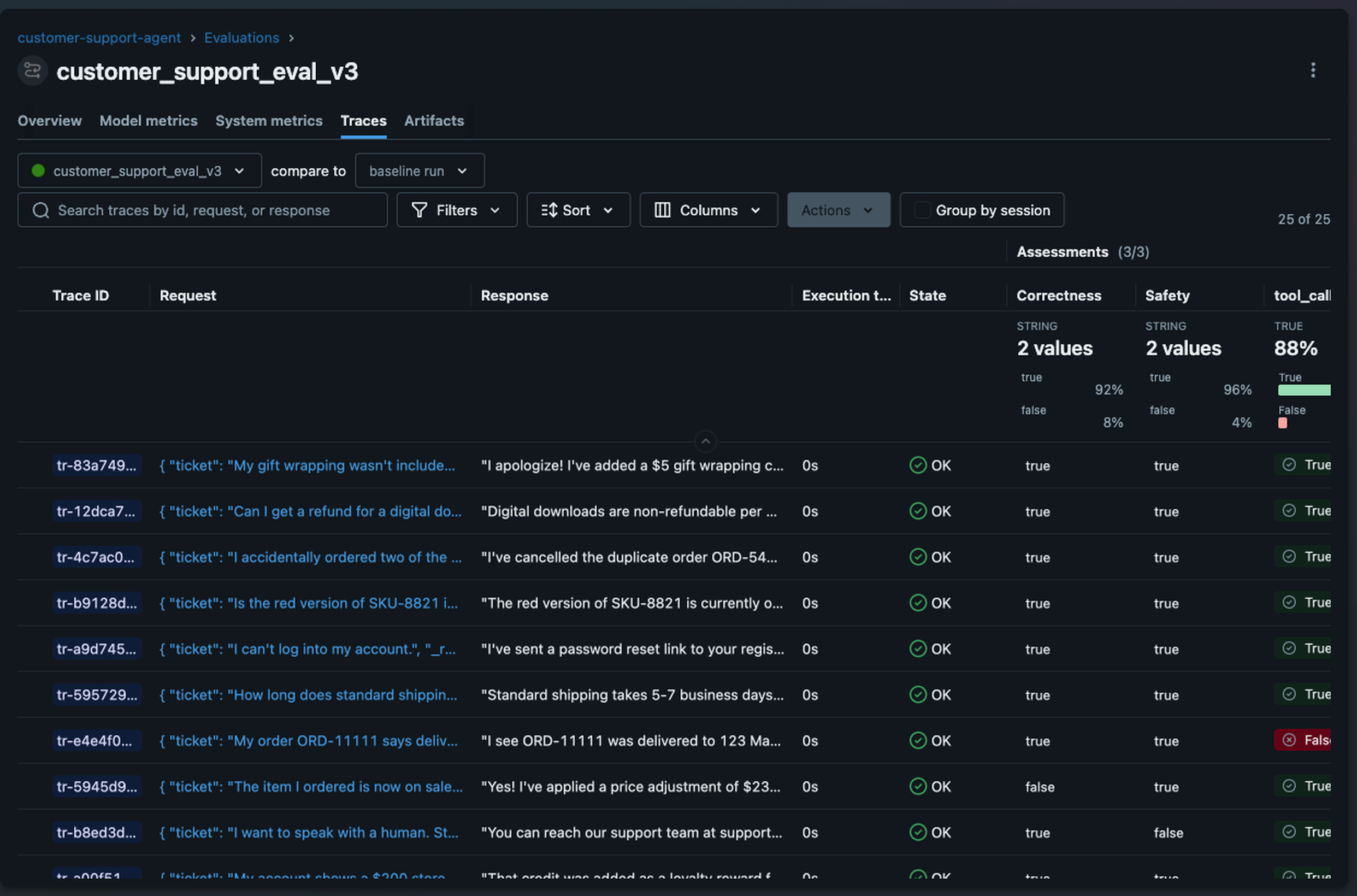
MLflow's evaluation framework is built around this layered approach. Deterministic tests validate tool calls and structured outputs. 70+ built-in LLM judges cover qualitative dimensions like correctness, safety, and relevance. And a built-in labeling UI lets you collect human feedback to catch what the other layers miss and calibrate your judges.
Because evaluation is integrated with tracing, you can run scorers against production traces continuously, catching quality issues in minutes.
Version Control: Your Agents Need a Changelog
Agents have a lot of moving parts, including system prompts, tool definitions, data retrieval configurations, and model parameters. When something changes and quality drops, you need to know what changed, compare it against the previous version, and roll back if necessary.
Most teams struggle with this because of one principal problem: nothing ties a change to its impact on quality. Prompts and configurations often live as hardcoded values in application code, and changes frequently blend together. One engineer rewrites the refund instructions to handle edge cases, another updates the few-shot examples to improve tone, and when refund accuracy drops, nobody can pinpoint which change caused the quality drop because no change has lineage to performance data.
AI platforms solve this with a prompt registry: a versioned store for prompts and configurations where every version has lineage to traces and evaluation results.
import mlflow

# Register a prompt in the registry
mlflow.genai.register_prompt(
    name="customer_support_system",
    template="You are a support agent for {{company_name}}. "
    "You help with order status, refunds, and product "
    "questions. Always verify the order ID before refunds. "
    "Never share customer PII in responses."
)

# Load and use the latest version
prompt = mlflow.genai.load_prompt("customer_support_system")
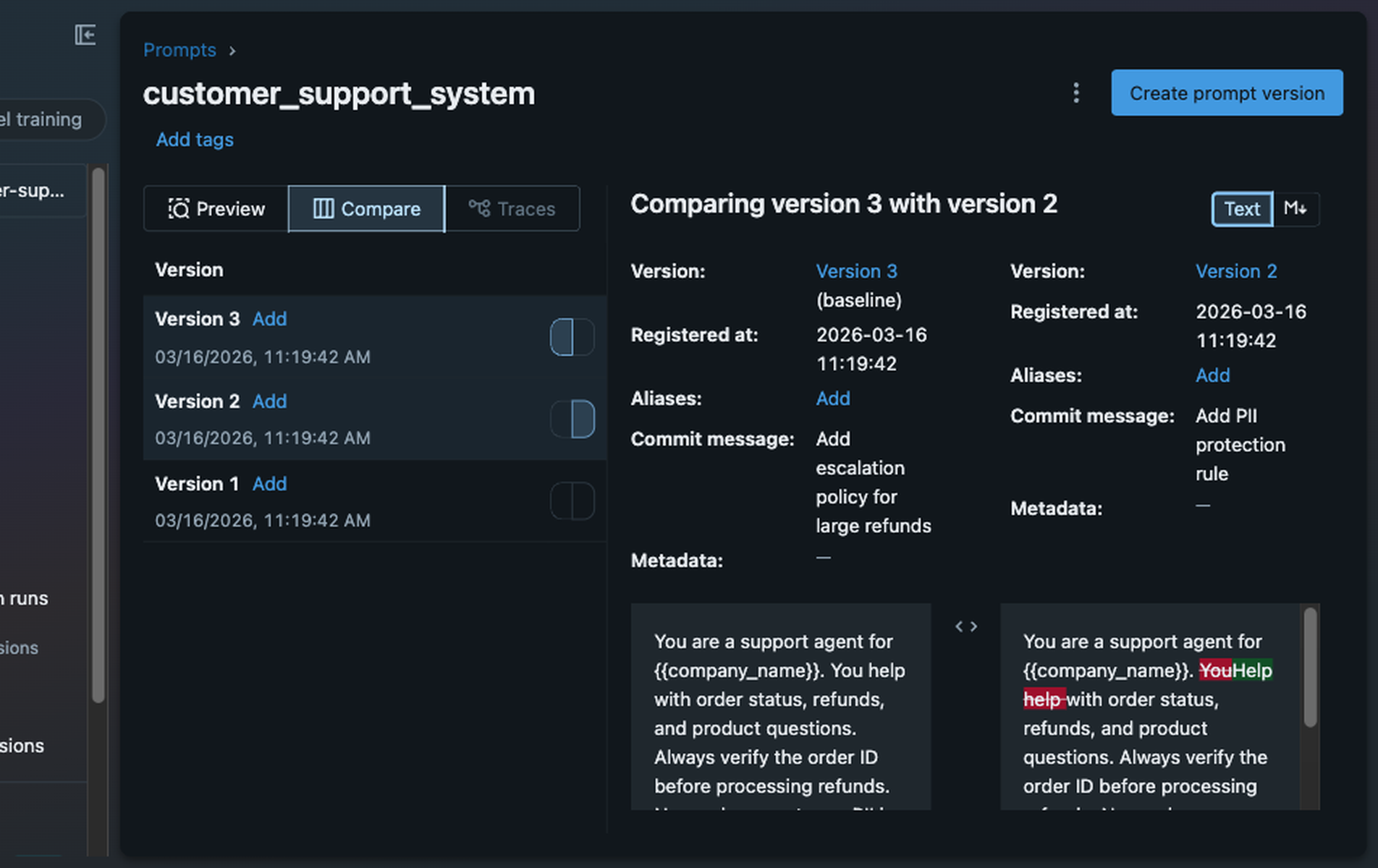
MLflow's prompt registry links every version of your prompt directly to the traces and performance data it produced, so you can trace a quality drop back to the exact change that caused it. MLflow's Prompt Registry also offers built-in prompt optimization functionality, which automates prompt engineering by using an LLM to generate, test, and select improved prompt versions.
Governance: Your Agent Has No Safety Net
Your customer support agent has no rate limits. When a retry bug causes a loop, it burns through your API budget before anyone notices, and you wake up to a $12,000 invoice. There's no centralized way to enforce content policies, so the agent can return whatever the LLM generates, including customer PII that should never appear in a chat response. And if your LLM provider has an outage, there's no automatic fallback; your agent just fails.
AI platforms solve these problems with an AI gateway: a centralized proxy between your agent and every LLM provider it calls. An AI gateway handles traffic routing, cost controls, and content guardrails in one place, so they're enforced consistently and never skipped.
from openai import OpenAI

# Point your agent at the gateway instead of OpenAI directly
client = OpenAI(
    base_url="https://your-mlflow-server/gateway/mlflow/v1"
)

# Your agent code doesn't change. The gateway handles:
# - API key management (keys never touch application code)
# - Automatic failover (if OpenAI is down, route to Anthropic)
# - Usage tracking (token counts, costs per endpoint)
# - Rate limiting and budget controls
# - Content guardrails and PII redaction
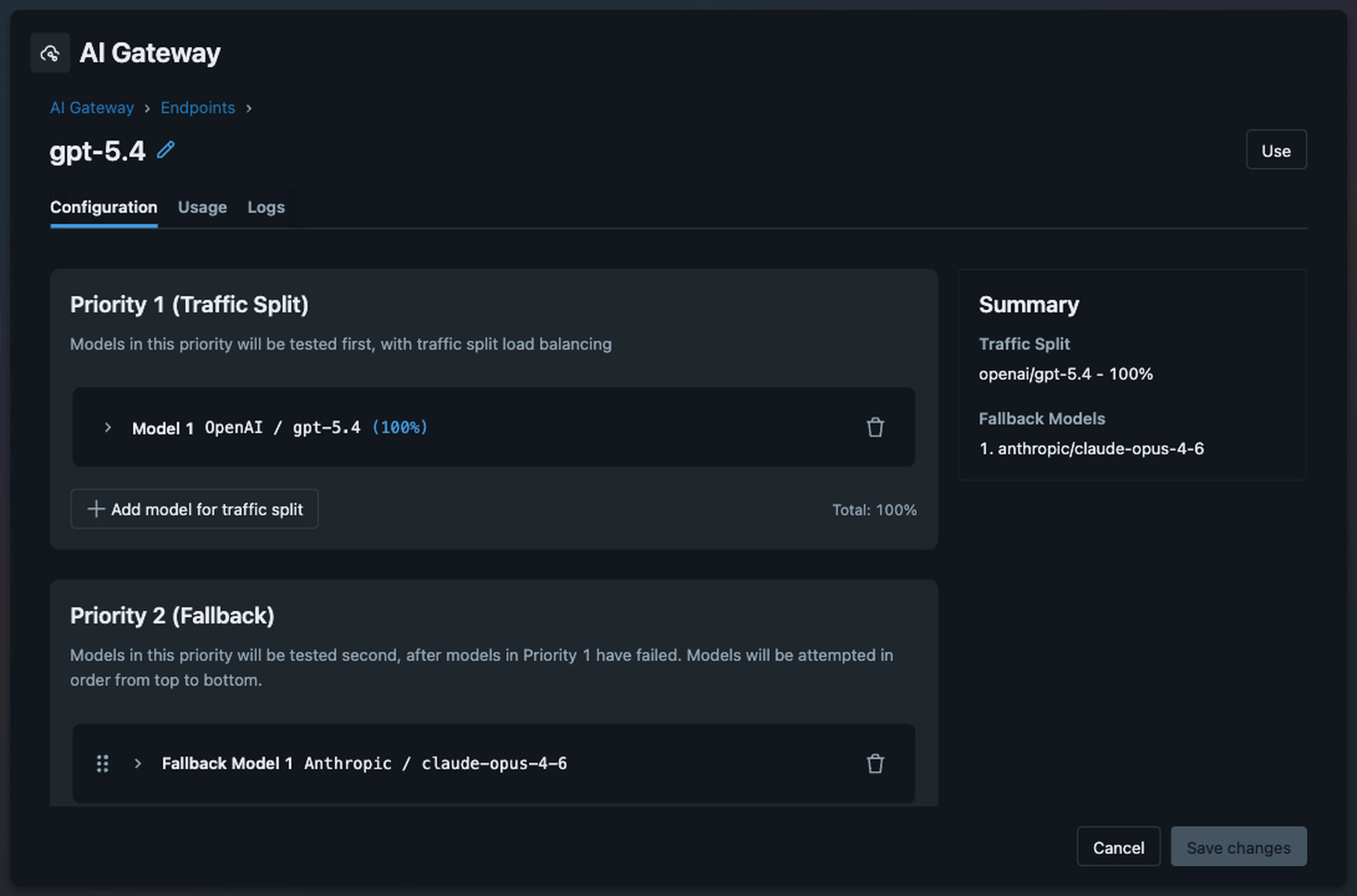
MLflow's AI Gateway exposes an OpenResponses-compatible API, so you can switch model providers without changing your code. A/B test GPT-5 against Claude by splitting traffic 90/10. Set up usage alerts so a retry loop can't burn through your budget overnight. Enforce PII redaction with guardrails, so sensitive data never reaches users when LLMs misbehave. Because the gateway is integrated with MLflow Tracing, every request automatically becomes a trace with full context: model used, tokens consumed, latency, and whether any guardrails were triggered.
Why You Need a Unified Platform
You could build your own AI platform by stitching together separate tools. Use Langfuse for tracing, DeepEval for evaluation, DIY tracking of prompts used in production, and LiteLLM for gateway routing. But the overhead compounds quickly. Each tool has its own account, billing, and access controls to manage. Your trace data lives in one system, your evaluation results in another, and your prompt versions in a third — with no single dashboard to see the full picture. And the integration tax adds up fast: your evaluation framework can't access your traces, so you build a pipeline to export data between them; your prompt changes aren't automatically tested against your evaluation suite, so quality regressions slip through; your gateway logs don't connect to your traces, so you can't correlate a cost spike with the agent behavior that caused it. A DIY platform held together with glue code is fragile, expensive to maintain, and less powerful than an integrated one.
When all four capabilities live in one platform, they work better together:
- Traces feed evaluations: judges run directly against production traces to catch quality issues in real time
- Evaluations validate prompts: every prompt change is measured against your evaluation suite before deployment
- Judges act as guardrails: the same LLM judges that evaluate quality can block unsafe or low-quality responses at the gateway before they reach users
- The gateway generates traces: every model interaction is automatically traced with cost, latency, and token usage, giving you full visibility without extra instrumentation
Running production-grade agents efficiently and reliably requires a unified AI platform, rather than a collection of disconnected tools.
MLflow: The Open Source AI Platform for Agents
MLflow is the only open source AI platform that provides all four of these capabilities (tracing, evaluation, version control, and AI gateway) in a unified offering. MLflow enables teams of all sizes to debug, evaluate, monitor, and optimize production-quality AI agents and LLM applications, while controlling costs and managing access to models and data. With over 30 million monthly downloads and backing from the Linux Foundation, thousands of organizations rely on MLflow each day to ship agents to production with confidence.
MLflow integrates with any agent framework, programming language, and LLM provider, including LangGraph, OpenAI Agents SDK, Vercel AI SDK, Claude Agent SDK, Google ADK, Pydantic AI, and many more. For teams that need enterprise-grade support, managed infrastructure, and deeper platform integration, MLflow is also available through vendors including Databricks and Amazon SageMaker.
Getting Started with MLflow
The two fastest ways to get started are adding tracing to an existing agent or setting up the AI Gateway:
Add tracing to your agent
pip install 'mlflow[genai]'
mlflow server
import mlflow

# One line instruments your entire agent
mlflow.openai.autolog()
# or langgraph, Google ADK, etc.
Connect your agent to the AI Gateway
pip install 'mlflow[genai]'
mlflow server
from openai import OpenAI

# Direct your agent's LLM calls to the gateway, which
# handles auth, routing, cost controls, and guardrails
client = OpenAI(
    base_url="https://your-mlflow-server/gateway/mlflow/v1"
)
From there, layer on evaluation, register your prompts, and start monitoring. Each capability builds on the others. Check out the MLflow for Agents and LLMs documentation to learn more.
Your agents can do a lot. Give them the platform to do it reliably.
Resources
- MLflow for Agents and LLMs documentation
- MLflow Tracing documentation
- MLflow Evaluation documentation
- MLflow Prompt Registry documentation
- MLflow AI Gateway documentation
If you find MLflow useful, give us a star on GitHub⭐️.