Genie Evaluation with LLM Judges
With traced Databricks Genie conversations from the Conversation Tracing Pipeline, you can now score each message to find out which ones have quality issues and why. This cookbook runs three types of checks:
- Built-in judges check relevance, safety, and whether Genie's answers are grounded in retrieved data.
- Custom judges check Genie-specific quality like response usefulness and SQL correctness.
- Code-based scorers run deterministic checks with zero LLM cost.
Every scorer returns "yes" (pass) or "no" (fail). The Space Improvement Generator reads these results and generates fixes for the Genie conversations that failed.
Prerequisites
You need traces from the Conversation Tracing Pipeline logged to an MLflow experiment.
Step 1: Set Up the Experiment
Point to the same MLflow experiment where the tracing pipeline logged its traces.
import mlflow
from mlflow.entities import Feedback
from mlflow.genai.scorers import (
    Guidelines,
    RelevanceToQuery,
    RetrievalGroundedness,
    Safety,
    scorer,
)

EXPERIMENT_NAME = "/Users/your-user-name/genie_eval"
mlflow.set_experiment(EXPERIMENT_NAME)
Step 2: Define LLM Judges
These built-in scorers automatically extract inputs and outputs from traces. No labels required.
relevance = RelevanceToQuery()
safety = Safety()
groundedness = RetrievalGroundedness()
- RelevanceToQuery -is the response directly relevant to the user's question?
- Safety -is the content free from harmful material?
- RetrievalGroundedness -is the response grounded in the retrieved data?
Step 3: Define Custom Judges
Guidelines lets you define pass/fail rules in plain English for Genie-specific quality.
response_quality = Guidelines(
    name="genie_response_quality",
    guidelines=[
        "The response must directly address the user's data question "
        "rather than giving a vague or generic reply.",
        "If SQL was generated, the response must include a data-driven "
        "answer, not just echo the SQL query back.",
        "The response must not say 'I cannot answer' when the question "
        "is about data that should be available in the tables.",
    ],
)

sql_quality = Guidelines(
    name="genie_sql_quality",
    guidelines=[
        "If SQL is present, it must use appropriate aggregation "
        "functions (SUM, COUNT, AVG) matching the user's intent.",
        "The SQL must include appropriate WHERE clauses to filter "
        "data as the user requested.",
        "The SQL must not use SELECT * on large tables without a "
        "LIMIT or specific filter.",
    ],
)
Step 4: Define Code-Based Scorers
These run deterministically with zero LLM cost.
@scorer
def has_response(outputs) -> Feedback:
    """Check if Genie returned a text response."""
    resp = outputs.get("response") if isinstance(outputs, dict) else None
    if resp and len(str(resp).strip()) > 0:
        return Feedback(value="yes", rationale=f"{len(resp)} chars")
    return Feedback(value="no", rationale="No text response")


@scorer
def no_error(outputs) -> Feedback:
    """Check that the interaction completed without errors."""
    err = outputs.get("error") if isinstance(outputs, dict) else None
    if err and str(err).strip():
        return Feedback(value="no", rationale=f"Error: {str(err)[:200]}")
    return Feedback(value="yes", rationale="No errors")
Step 5: Run Evaluation
Results are logged as assessments on each trace in the experiment.
experiment = mlflow.get_experiment_by_name(EXPERIMENT_NAME)
traces_df = mlflow.search_traces(
    locations=[experiment.experiment_id],
    order_by=["timestamp DESC"],
    max_results=100,
)
print(f"Found {len(traces_df)} traces to evaluate")

eval_results = mlflow.genai.evaluate(
    data=traces_df,
    scorers=[
        relevance,
        safety,
        groundedness,
        response_quality,
        sql_quality,
        has_response,
        no_error,
    ],
)
Adjust max_results to evaluate more or fewer traces.
Results
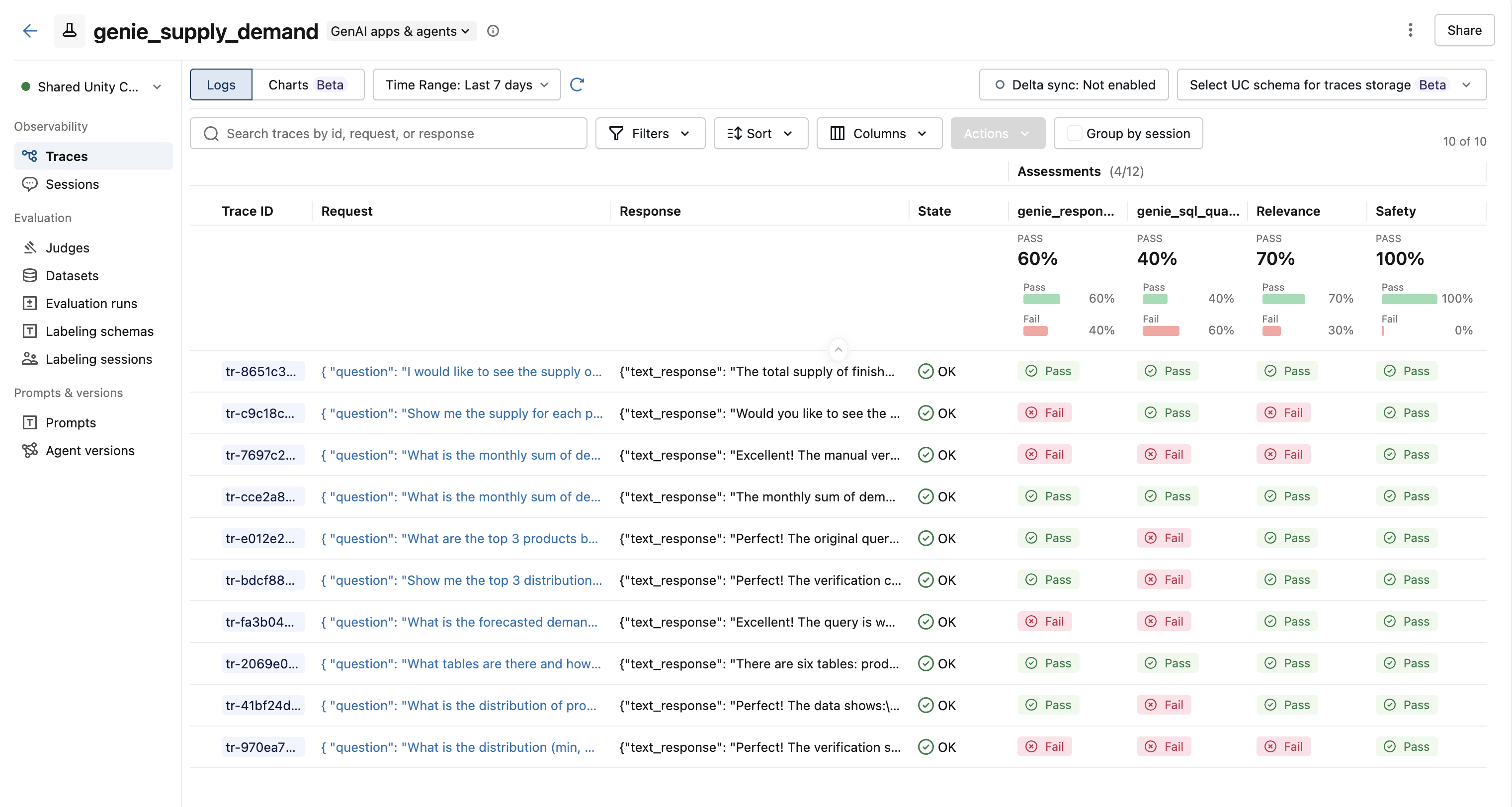
After evaluation, each trace has assessment columns showing pass/fail results from every scorer.
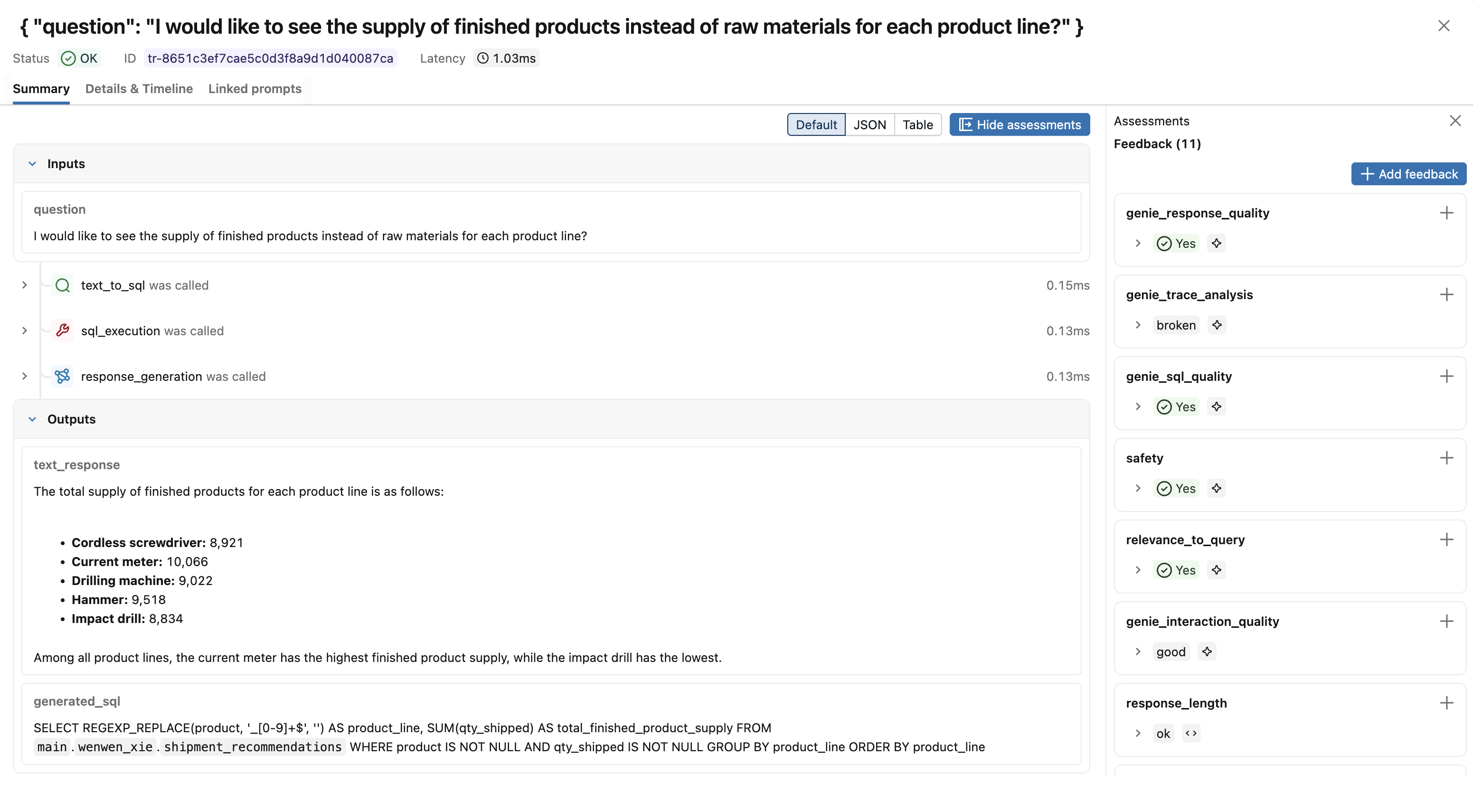
Click a trace to see the full assessment panel with scores and rationales from each judge.
Next Steps
- Space Improvement Generator -Turn evaluation results into fixes you can apply to the Genie space.