Tracing OpenAI
MLflow Tracing provides automatic tracing capability for OpenAI. By enabling auto tracing
for OpenAI by calling the mlflow.openai.autolog() function, MLflow will capture traces for LLM invocation and log them to the active MLflow Experiment. In Typescript, you can instead use the tracedOpenAI function to wrap the OpenAI client.
MLflow trace automatically captures the following information about OpenAI calls:
- Prompts and completion responses
- Latencies
- Token usage
- Model name
- Additional metadata such as
temperature,max_completion_tokens, if specified. - Function calling if returned in the response
- Built-in tools such as web search, file search, computer use, etc.
- Any exception if raised
- and more...
Getting Started
Install Dependencies
- Python
- JS / TS
pip install 'mlflow[genai]' openai
npm install mlflow-openai openai
Start MLflow Server
- Local (pip)
- Local (docker)
If you have a local Python environment >= 3.10, you can start the MLflow server locally using the mlflow CLI command.
mlflow server
MLflow also provides a Docker Compose file to start a local MLflow server with a postgres database and a minio server.
git clone --depth 1 --filter=blob:none --sparse https://github.com/mlflow/mlflow.git
cd mlflow
git sparse-checkout set docker-compose
cd docker-compose
cp .env.dev.example .env
docker compose up -d
Refer to the instruction for more details, e.g., overriding the default environment variables.
Enable Tracing and Make API Calls
- Chat Completion API
- Responses API
- JS / TS
Enable tracing with mlflow.openai.autolog() and make API calls as usual.
import openai
import mlflow

# Enable auto-tracing for OpenAI
mlflow.openai.autolog()

# Set a tracking URI and an experiment
mlflow.set_tracking_uri("http://localhost:5000")
mlflow.set_experiment("OpenAI")

# Invoke the OpenAI model as usual
client = openai.OpenAI()
response = client.chat.completions.create(
    model="o4-mini",
    messages=[
        {"role": "system", "content": "You are a helpful weather assistant."},
        {"role": "user", "content": "What is the capital of France?"},
    ],
    max_completion_tokens=100,
)
Enable tracing with mlflow.openai.autolog() and make API calls as usual.
import openai
import mlflow

# Enable auto-tracing for OpenAI
mlflow.openai.autolog()

# Optional: Set a tracking URI and an experiment
mlflow.set_tracking_uri("http://localhost:5000")
mlflow.set_experiment("OpenAI")

openai_client = openai.OpenAI()

response = client.responses.create(
    model="o4-mini", input="What is the capital of France?"
)
Wrap the OpenAI client with the tracedOpenAI function and make API calls as usual.
import { OpenAI } from "openai";
import { tracedOpenAI } from "mlflow-openai";

// Wrap the OpenAI client with the tracedOpenAI function
const client = tracedOpenAI(new OpenAI());

// Invoke the client as usual
const response = await client.chat.completions.create({
    model: "o4-mini",
    messages: [
        {"role": "system", "content": "You are a helpful weather assistant."},
        {"role": "user", "content": "What's the weather like in Seattle?"},
    ],
})
View Traces in MLflow UI
Browse to the MLflow UI at http://localhost:5000 (or your MLflow server URL) and you should see the traces for the OpenAI API calls.
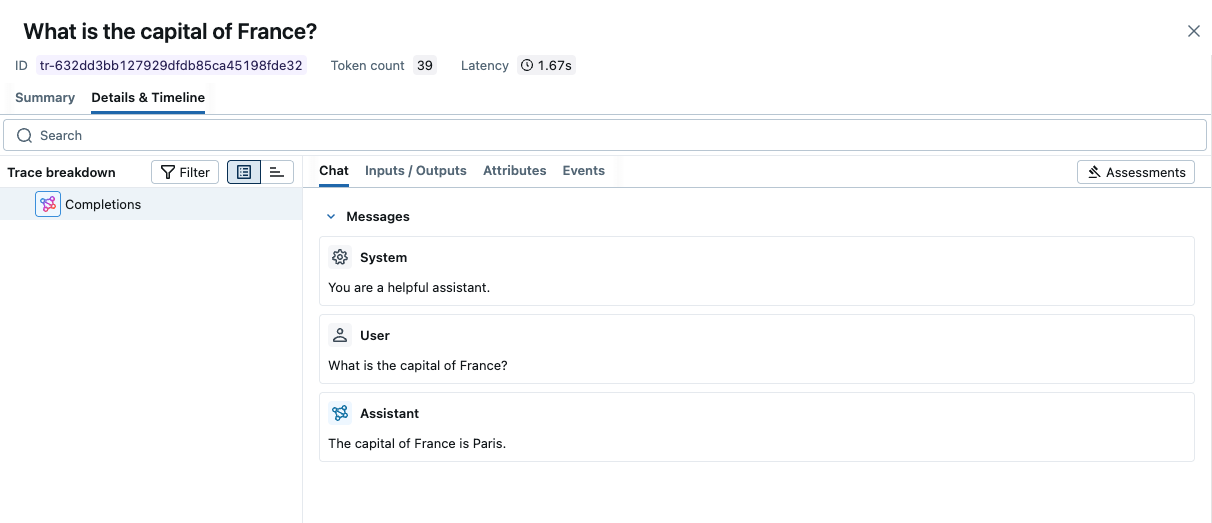
→ View Next Steps for learning about more MLflow features like user feedback tracking, prompt management, and evaluation.
Supported APIs
MLflow supports automatic tracing for the following OpenAI APIs. To request support for additional APIs, please open a feature request on GitHub.
Chat Completion API
| Normal | Function Calling | Structured Outputs | Streaming | Async | Image | Audio |
|---|---|---|---|---|---|---|
| ✅ | ✅ | ✅(>=2.21.0) | ✅ (>=2.15.0) | ✅(>=2.21.0) | - | - |
Responses API
| Normal | Function Calling | Structured Outputs | Web Search | File Search | Computer Use | Reasoning | Streaming | Async | Image |
|---|---|---|---|---|---|---|---|---|---|
| ✅ | ✅ | ✅ | ✅ | ✅ | ✅ | ✅ | ✅ | ✅ | - |
Responses API is supported since MLflow 2.22.0.
Agents SDK
See OpenAI Agents SDK Tracing for more details.
Embedding API
| Normal | Async |
|---|---|
| ✅ | ✅ |
Streaming
MLflow Tracing supports streaming API of the OpenAI SDK. With the same set up of auto tracing, MLflow automatically traces the streaming response and render the concatenated output in the span UI. The actual chunks in the response stream can be found in the Event tab as well.
- Chat Completion API
- Responses API
- JS / TS
import openai
import mlflow

# Enable trace logging
mlflow.openai.autolog()

client = openai.OpenAI()

stream = client.chat.completions.create(
    model="o4-mini",
    messages=[
        {"role": "user", "content": "How fast would a glass of water freeze on Titan?"}
    ],
    stream=True,  # Enable streaming response
)
for chunk in stream:
    print(chunk.choices[0].delta.content or "", end="")
import openai
import mlflow

# Enable trace logging
mlflow.openai.autolog()

client = openai.OpenAI()

stream = client.responses.create(
    model="o4-mini",
    input="How fast would a glass of water freeze on Titan?",
    stream=True,  # Enable streaming response
)
for event in stream:
    print(event)
import { OpenAI } from "openai";
import { tracedOpenAI } from "mlflow-openai";

// Wrap the OpenAI client with the tracedOpenAI function
const client = tracedOpenAI(new OpenAI());

const stream = await client.chat.completions.create({
    model: "o4-mini",
    messages: [
        {"role": "user", "content": "How fast would a glass of water freeze on Titan?"},
    ],
    stream: true,
});
Async
MLflow Tracing supports asynchronous API of the OpenAI SDK since MLflow 2.21.0. The usage is same as the synchronous API.
- Chat Completion API
- Responses API
- JS / TS
import openai

# Enable trace logging
mlflow.openai.autolog()

client = openai.AsyncOpenAI()

response = await client.chat.completions.create(
    model="gpt-4o-mini",
    messages=[
        {"role": "user", "content": "How fast would a glass of water freeze on Titan?"}
    ],
    # Async streaming is also supported
    # stream=True
)
import openai

# Enable trace logging
mlflow.openai.autolog()

client = openai.AsyncOpenAI()

response = await client.responses.create(
    model="gpt-4o-mini", input="How fast would a glass of water freeze on Titan?"
)
OpenAI Typescript / Javascript SDK is natively async. See the basic example above.
Combine with Manual Tracing
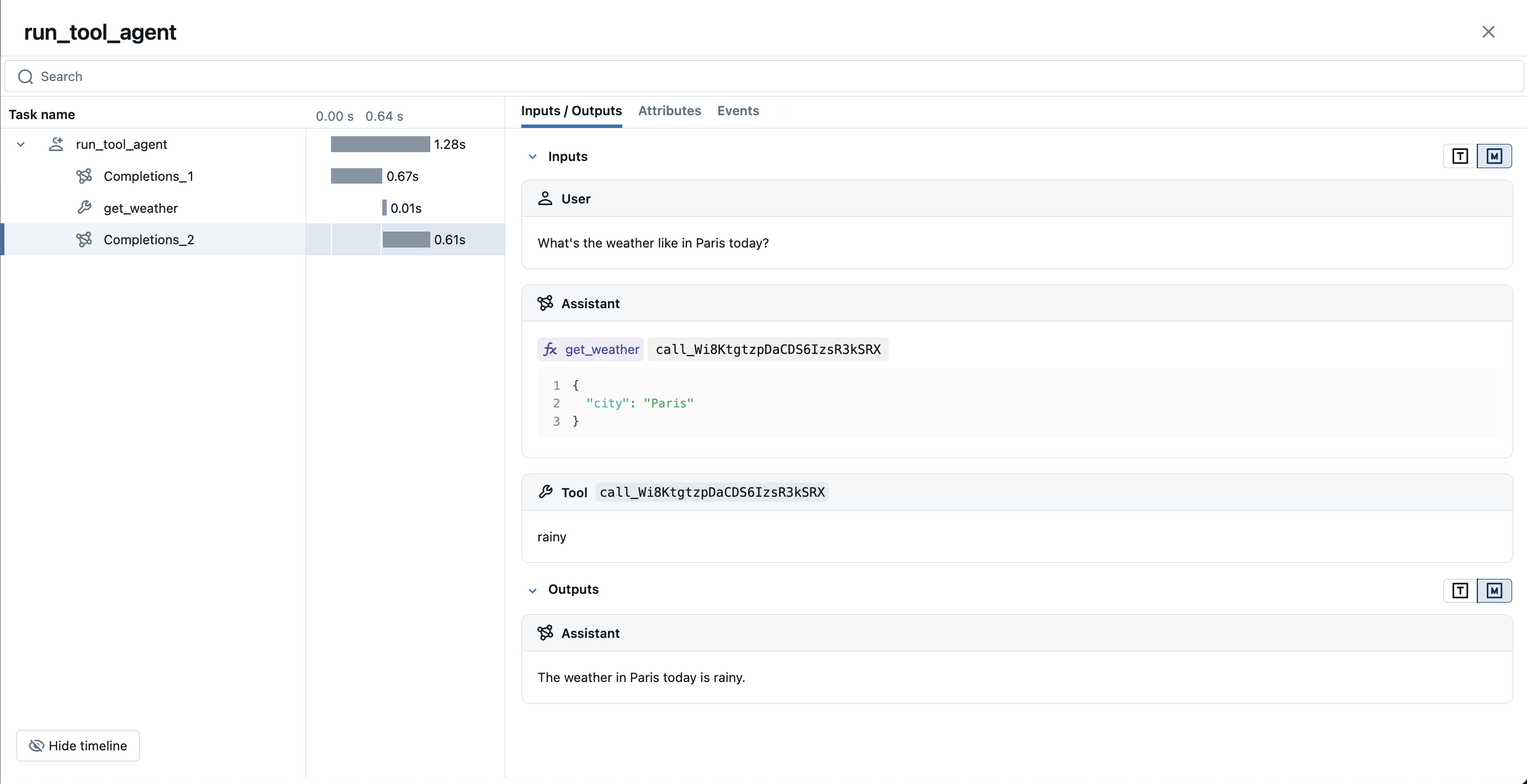
To control the tracing behavior more precisely, MLflow provides Manual Tracing SDK to create spans for your custom code. Manual tracing can be used in conjunction with auto-tracing to create a custom trace while keeping the auto-tracing convenience.
The following example shows how to combine auto-tracing and manual tracing to create a function calling agent. MLflow Tracing automatically captures function calling response from OpenAI models. The function instruction in the response will be highlighted in the trace UI. The @mlflow.trace decorator from manual tracing SDK is applied to the tool function (get_weather) and the parent agent function (run_tool_agent) to create a complete trace for the agent execution.
- Chat Completion API
- Responses API
- JS / TS
import json
from openai import OpenAI
import mlflow
from mlflow.entities import SpanType

client = OpenAI()


# Define the tool function. Decorate it with `@mlflow.trace` to create a span for its execution.
@mlflow.trace(span_type=SpanType.TOOL)
def get_weather(city: str) -> str:
    if city == "Tokyo":
        return "sunny"
    elif city == "Paris":
        return "rainy"
    return "unknown"


tools = [
    {
        "type": "function",
        "function": {
            "name": "get_weather",
            "parameters": {
                "type": "object",
                "properties": {"city": {"type": "string"}},
            },
        },
    }
]

_tool_functions = {"get_weather": get_weather}


# Define a simple tool calling agent
@mlflow.trace(span_type=SpanType.AGENT)
def run_tool_agent(question: str):
    messages = [{"role": "user", "content": question}]

    # Invoke the model with the given question and available tools
    response = client.chat.completions.create(
        model="gpt-4o-mini",
        messages=messages,
        tools=tools,
    )
    ai_msg = response.choices[0].message
    messages.append(ai_msg)

    # If the model request tool call(s), invoke the function with the specified arguments
    if tool_calls := ai_msg.tool_calls:
        for tool_call in tool_calls:
            function_name = tool_call.function.name
            if tool_func := _tool_functions.get(function_name):
                args = json.loads(tool_call.function.arguments)
                tool_result = tool_func(**args)
            else:
                raise RuntimeError("An invalid tool is returned from the assistant!")

            messages.append(
                {
                    "role": "tool",
                    "tool_call_id": tool_call.id,
                    "content": tool_result,
                }
            )

        # Sent the tool results to the model and get a new response
        response = client.chat.completions.create(
            model="gpt-4o-mini", messages=messages
        )

    return response.choices[0].message.content


# Run the tool calling agent
question = "What's the weather like in Paris today?"
answer = run_tool_agent(question)
import json
import requests
from openai import OpenAI
import mlflow
from mlflow.entities import SpanType
client = OpenAI()
# Define the tool function. Decorate it with `@mlflow.trace` to create a span for its execution.
@mlflow.trace(span_type=SpanType.TOOL)
def get_weather(latitude, longitude):
response = requests.get(
f"https://api.open-meteo.com/v1/forecast?latitude={latitude}&longitude={longitude}¤t=temperature_2m,wind_speed_10m&hourly=temperature_2m,relative_humidity_2m,wind_speed_10m"
)
data = response.json()
return data["current"]["temperature_2m"]
tools = [
{
"type": "function",
"name": "get_weather",
"description": "Get current temperature for provided coordinates in celsius.",
"parameters": {
"type": "object",
"properties": {
"latitude": {"type": "number"},
"longitude": {"type": "number"},
},
"required": ["latitude", "longitude"],
"additionalProperties": False,
},
"strict": True,
}
]
# Define a simple tool calling agent
@mlflow.trace(span_type=SpanType.AGENT)
def run_tool_agent(question: str):
messages = [{"role": "user", "content": question}]
# Invoke the model with the given question and available tools
response = client.responses.create(
model="gpt-4o-mini",
input=question,
tools=tools,
)
# Invoke the function with the specified arguments
tool_call = response.output[0]
args = json.loads(tool_call.arguments)
result = get_weather(args["latitude"], args["longitude"])
# Sent the tool results to the model and get a new response
messages.append(tool_call)
messages.append(
{
"type": "function_call_output",
"call_id": tool_call.call_id,
"output": str(result),
}
)
response = client.responses.create(
model="gpt-4o-mini",
input=input_messages,
tools=tools,
)
return response.output[0].content[0].text
# Run the tool calling agent
question = "What's the weather like in Paris today?"
answer = run_tool_agent(question)
Refer to the Typescript OpenAI Quickstart for the example of function calling agent in Typescript SDK.
Tracking Token Usage and Cost
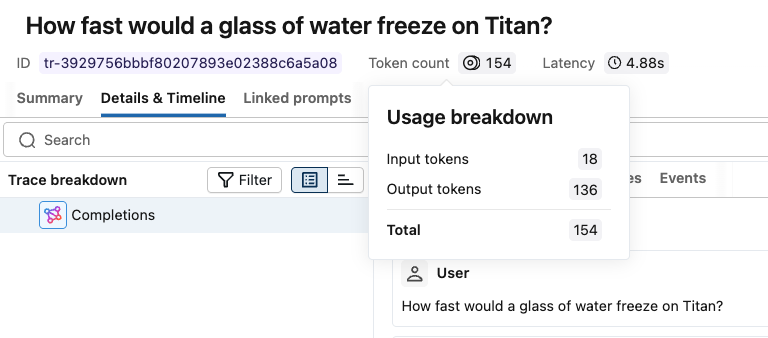
MLflow automatically tracks token usage and cost for OpenAI API calls. The token usage for each LLM call will be logged in each Trace/Span and the aggregated cost and time trend are displayed in the built-in dashboard. See the Token Usage and Cost Tracking documentation for details on accessing this information programmatically.
Supported APIs:
Token usage and cost tracking is supported for the following OpenAI APIs:
| Mode | Chat Completion | Responses | JS / TS |
|---|---|---|---|
| Normal | ✅ | ✅ | ✅ |
| Streaming | ✅(*1) | ✅ | ✅ |
| Async | ✅ | ✅ | ✅ |
(*1) By default, OpenAI does not return token usage information for Chat Completion API when streaming. To track token usage, you need to specify stream_options={"include_usage": True} in the request (OpenAI API Reference).
Disable auto-tracing
Auto tracing for OpenAI can be disabled globally by calling mlflow.openai.autolog(disable=True) or mlflow.autolog(disable=True).
Next steps
Track User Feedback
Record user feedback on traces for tracking user satisfaction.
Manage Prompts
Learn how to manage prompts with MLflow's prompt registry.
Evaluate Traces
Evaluate traces with LLM judges to understand and improve your AI application's behavior.