Archive Traces
Trace archival lets MLflow move older trace span payloads out of the SQL tracking store and into a configured archive artifact location while keeping the traces readable in the UI and APIs. To enable trace archival on a self-hosted server, see MLflow Tracking Server.
Trace archival is different from deleting traces and different from moving model versions to the
Model Registry Archived stage.
What Trace Archival Does
After a trace is archived, MLflow keeps the trace metadata and archive pointer in the tracking store, then reads the span payloads from archive storage when you open the trace.
This helps reduce the amount of trace content stored in the SQL backend while preserving access to older traces for debugging, auditing, and evaluation workflows.
Important limitations after archival
Archived traces remain readable, but searches that depend on span payloads, such as trace.text
and span.content, stop working after those payloads move
out of the tracking store. MLflow also
does not allow appending new spans to an archived trace.
At a high level, the flow looks like this:

Configuring Retention Policy
How Retention Is Resolved
MLflow resolves archival policy from broadest scope to narrowest scope:
| Scope | How to configure it | What it controls |
|---|---|---|
| Server | MLFLOW_TRACE_ARCHIVAL_CONFIG YAML | Default archive location, default retention, and scheduler settings |
| Workspace | mlflow.create_workspace() / mlflow.update_workspace() with TraceArchivalConfig | Workspace-specific archive location and retention defaults |
| Experiment | mlflow experiments create / mlflow experiments update | Experiment-specific retention override and archive-now requests only |
A shorter experiment retention overrides the broader policy automatically. A longer experiment
retention is only honored when that experiment's ID is listed in the server
long_retention_allowlist; otherwise MLflow falls back to the broader retention.
Archive location is resolved only from the server or workspace configuration. Experiment-level settings can change retention and request archive-now processing, but they do not change where archived span payloads are stored.
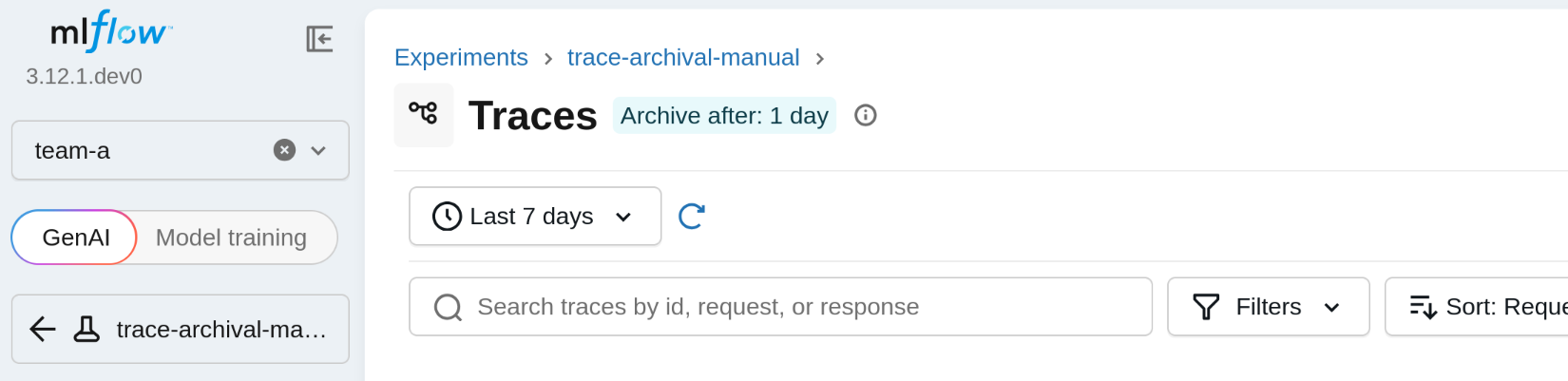
When the effective retention is known, MLflow surfaces it in trace-focused experiment views as an
Archive after: ... badge.
::::warning Archival cannot be undone MLflow does not currently support restoring archived span payloads back to the tracking store. Archived traces remain readable, but once archival completes, the trace continues to be served from archive storage rather than the database. ::::
Before You Configure Retention
Trace archival is a server-owned feature. Workspace-level and experiment-level settings take effect only after an administrator enables archival on the tracking server.
For workspace-specific setup, see Getting Started with Workspaces.
Set Workspace-Level Defaults
With workspaces enabled, administrators can override the broader archival defaults for a specific workspace:
- Python API
- UI
import mlflow
from mlflow.entities import TraceArchivalConfig

mlflow.set_tracking_uri("http://localhost:5000")

workspace = mlflow.create_workspace(
    name="team-a",
    description="Workspace for Team A traces",
    default_artifact_root="s3://team-a-artifacts",
    trace_archival_config=TraceArchivalConfig(
        location="s3://mlflow-trace-archive/team-a",
        retention="14d",
    ),
)

print(workspace)
Update an existing workspace in the same way:
import mlflow
from mlflow.entities import TraceArchivalConfig

mlflow.set_tracking_uri("http://localhost:5000")

updated = mlflow.update_workspace(
    name="team-a",
    trace_archival_config=TraceArchivalConfig(
        location="s3://mlflow-trace-archive/team-a",
        retention="7d",
    ),
)

print(updated)
Use empty strings to clear a workspace override and fall back to the broader server policy:
import mlflow
from mlflow.entities import TraceArchivalConfig

mlflow.set_tracking_uri("http://localhost:5000")

mlflow.update_workspace(
    name="team-a",
    trace_archival_config=TraceArchivalConfig(location="", retention=""),
)
Create a workspace with archival settings
- In a workspace-enabled MLflow server, go to the workspaces list at
/. - Click Create New Workspace.
- Expand Trace Archival Settings.
- Provide Trace Archival Location and Trace Archival Retention.
- Click Save.
Update a workspace
- In a workspace-enabled MLflow server, go to the workspaces list at
/. - For a specific workspace, click the edit icon on the right.
- Expand Trace Archival Settings.
- Provide Trace Archival Location and Trace Archival Retention.
- Click Save.
To clear a workspace override, follow the same update flow and clear the archival fields before saving.
Set Experiment-Level Retention
You can set an experiment-specific retention override when you create an experiment or later through the CLI or from the experiment UI.
- CLI
- UI
Create an experiment with a retention override:
mlflow experiments create \
  --experiment-name "support-bot" \
  --trace-archival-retention 7d
Update or clear the override later:
mlflow experiments update \
  --experiment-id 123 \
  --trace-archival-retention 7d

mlflow experiments update \
  --experiment-id 123 \
  --clear-trace-archival-retention
These commands configure archival policy; they do not archive traces immediately.
Update an experiment retention setting:
- Navigate to a specific experiment, for example
/experiments/2/overview/usage?workspace=team-a. - Click the three-dot menu in the top-right corner and select Edit Experiment.
- Enter Trace archival retention in the edit dialog.
- Click Save.
Leave the retention field blank to inherit the workspace or server default.
Trigger Archival Immediately
Use archive-now when you want the server to process a specific experiment on the next scheduler pass without changing its long-term retention policy.
Archive all eligible traces for an experiment:
mlflow experiments update \
  --experiment-id 123 \
  --trace-archive-now
Archive only traces older than a specific age:
mlflow experiments update \
  --experiment-id 123 \
  --trace-archive-now-older-than 1d
Clear a pending archive-now request:
mlflow experiments update \
  --experiment-id 123 \
  --clear-trace-archive-now
Archive-now marks the experiment for the next scheduler pass. It does not execute archival inline from the client.
What Changes After Archival
Archived traces remain accessible in MLflow. You can still open them in the UI and retrieve them through trace APIs.
The biggest behavior change is searchability. Searches that depend on span payloads, including
trace.text and span.content filters, no longer work after those payloads have been archived out
of the SQL store. Metadata- and tag-based filters continue to work.
Archived traces also reject new span writes. If your application tries to append more spans after a trace has been archived, MLflow returns a write-conflict error.
Limitations and Troubleshooting
- Retry behavior depends on the failure type. Transient storage, repository, or database failures
remain retryable and are picked up again on later scheduler passes. Malformed-trace failures are
marked with the
mlflow.trace.archivalFailuresystem tag and skipped on future passes until the underlying trace data is fixed and the tag is cleared. - If a trace is stuck in a malformed state, administrators can clear
mlflow.trace.archivalFailurewithmlflow.client.MlflowClient.delete_trace_tag()after fixing the underlying trace data so the scheduler can try again. - If
archive-nowwas requested for an experiment, the request stays pending while retryable or otherwise unresolved traces remain. It clears after matching traces are archived successfully or only terminal malformed failures remain. - If you need to remove old traces permanently rather than move their payloads, use Delete Traces.
For related workflows, see View Traces and Search Traces.