Prompt Optimization
Prompt optimization automates the prompt engineering process for LLM applications. Traditional prompt engineering relies on manual "guess and check": a human writes a prompt, spot-checks a few outputs, tweaks wording, and repeats. Prompt optimization replaces this with algorithms that systematically analyze performance on training data, identify failure patterns, and generate improved prompt variants until quality converges.
Why Optimize Prompts?
Manual prompt engineering is slow, inconsistent, and hard to scale. Prompt optimization addresses these challenges:
Manual Guesswork
Problem: Engineers tweak prompts based on intuition and spot-check a handful of outputs, missing failure patterns that only appear at scale.
Solution: Optimizers evaluate prompts across hundreds of examples, systematically finding and fixing issues that humans miss.
Unreproducible Results
Problem: There's no record of which prompt variants were tried, what worked, or why changes were made. Knowledge is lost when team members change.
Solution: Every optimization run, prompt version, and metric is tracked in MLflow, creating a complete audit trail.
Scaling to New Tasks
Problem: A team with 10 LLM features can't afford to have an engineer manually tuning each prompt indefinitely.
Solution: Automated optimization runs in minutes to hours, and can be re-run whenever models change or requirements evolve.
Diminishing Returns
Problem: Human prompt engineers often plateau quickly, unable to identify the subtle instruction changes that would improve edge cases.
Solution: Algorithms like GEPA analyze failure patterns at scale and generate targeted improvements for specific edge cases.
How Does Prompt Optimization Work?
Prompt optimizers work by running an automated loop that no human could replicate at scale. Instead of one person tweaking a prompt and eyeballing a few outputs, an optimizer tests the prompt against hundreds of examples, uses an LLM to figure out what went wrong, rewrites the prompt to fix those problems, and repeats. Leading optimizers like GEPA, MIPROv2, SIMBA, and DSPy all follow this same four-step cycle:
How to Implement Prompt Optimization
MLflow provides a unified prompt optimization API (mlflow.genai.optimize_prompts) that wraps optimizers like GEPA and DSPy behind a single interface, so you can try different algorithms without changing your code. The process integrates tightly with the MLflow Prompt Registry: you register a base prompt, the optimizer generates and tests improved variants, and the best result is saved as a new prompt version. Every run, metric, and trace is tracked automatically, so you can compare performance across versions, inspect individual predictions, and roll back to any previous prompt at any time.
The workflow works with any agent framework (OpenAI Agents SDK, LangChain, LangGraph, CrewAI, etc.) and any LLM provider. You provide training data with expected outputs, choose an optimizer algorithm, and MLflow handles the rest.
Example
The following example uses GEPA (Gradient-free Estimated Prompt-optimization Algorithm) to optimize a question-answering prompt. GEPA evaluates the current prompt on training examples, analyzes failure patterns, generates improved variants, selects the best performer, and repeats until convergence.
import mlflowfrom mlflow.genai.optimize import GepaPromptOptimizerfrom mlflow.genai.scorers import Correctness# Register a base prompt in the MLflow Prompt Registrybase_prompt = mlflow.genai.register_prompt(name="qa-prompt",template=("Answer the question based on the context.\n\n""Context: {{ context }}\n""Question: {{ question }}\n\n""Answer:"),)# Prepare training data with expected outputstrain_data = [{"inputs": {"context": "MLflow is an open source AI platform.","question": "What is MLflow?"},"expectations": {"expected_response": "An open source AI platform"},},# ... more labeled examples (50-100 recommended)]# Run GEPA optimizationresult = mlflow.genai.optimize_prompts(predict_fn=my_predict_fn,train_data=train_data,prompt_uris=[base_prompt.uri],optimizer=GepaPromptOptimizer(reflection_model="openai:/gpt-5.2",max_metric_calls=500,),# LLM judge that scores each candidate prompt's responses;# the optimizer uses these scores as a reward signal# to guide its search and identify prompt improvementsscorers=[Correctness()],enable_tracking=True,)# Print the optimized promptoptimized = mlflow.genai.load_prompt(result.optimized_prompts[0].uri)print(optimized.template)
With enable_tracking=True, every optimization run is logged to MLflow. You can compare evaluation scores across runs, see exactly how the optimizer improved the prompt, and roll back to any previous version at any time.
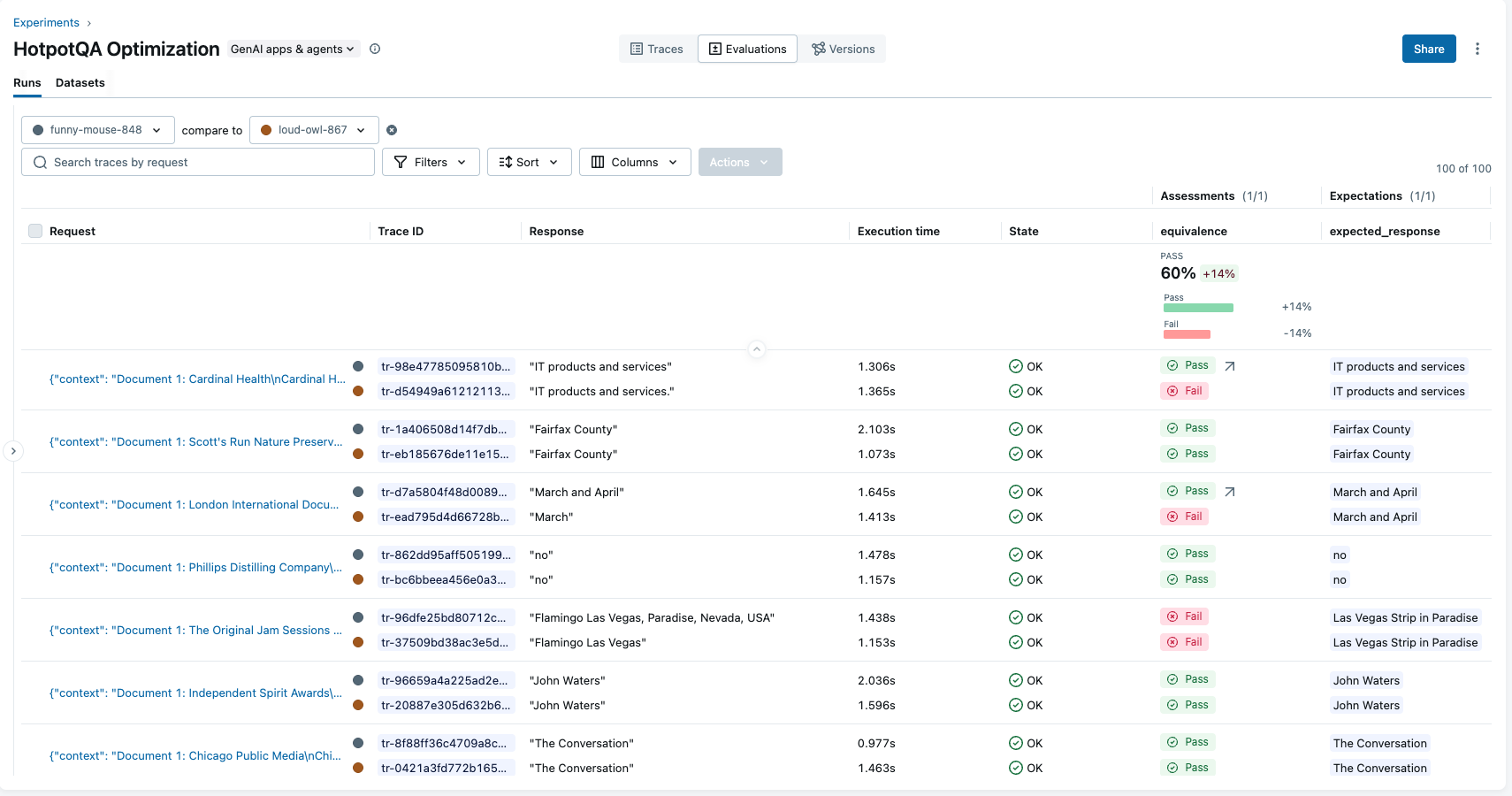
MLflow tracks performance results across prompt versions for easy comparison.
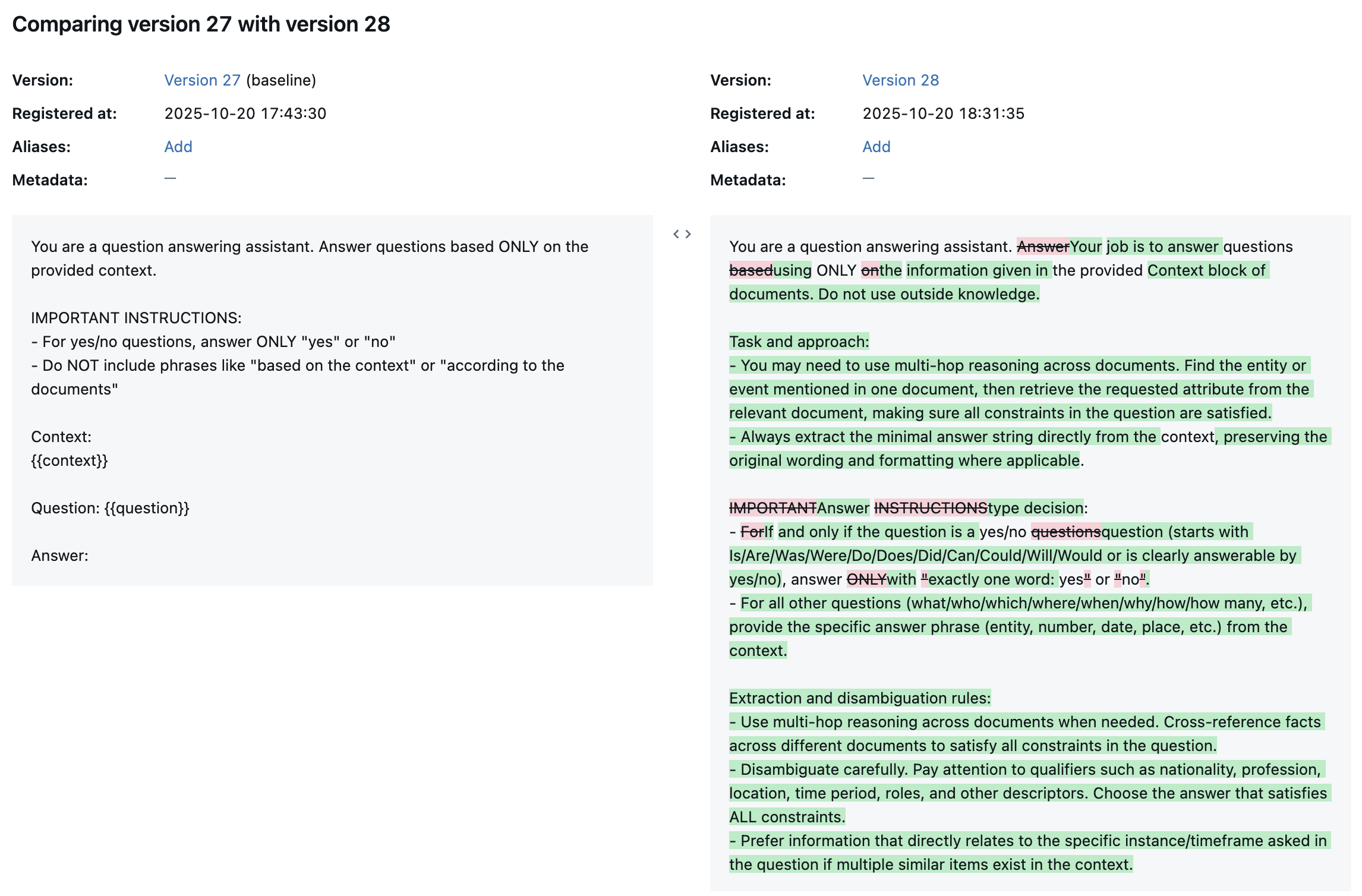
Optimized prompts are versioned in the MLflow Prompt Registry with full diff highlighting.
MLflow is the largest open-source AI engineering platform, with over 30 million monthly downloads. Thousands of organizations use MLflow to debug, evaluate, monitor, and optimize production-quality AI agents and LLM applications while controlling costs and managing access to models and data. Backed by the Linux Foundation and licensed under Apache 2.0, MLflow provides automated prompt optimization with no vendor lock-in. Get started →