Prompt Registry for LLM and Agent Applications
A prompt registry is a centralized repository for storing, versioning, and managing the prompt templates that power LLM and agent applications. For teams managing prompt engineering at scale, a prompt registry is the foundational infrastructure — it provides prompt versioning with diff views and commit messages, evaluation integration for quality testing, and environment aliases for safe deployments. Prompt registries decouple prompts from application code, enabling faster iteration without redeployments. A prompt registry is a core component of AI observability and LLMOps.
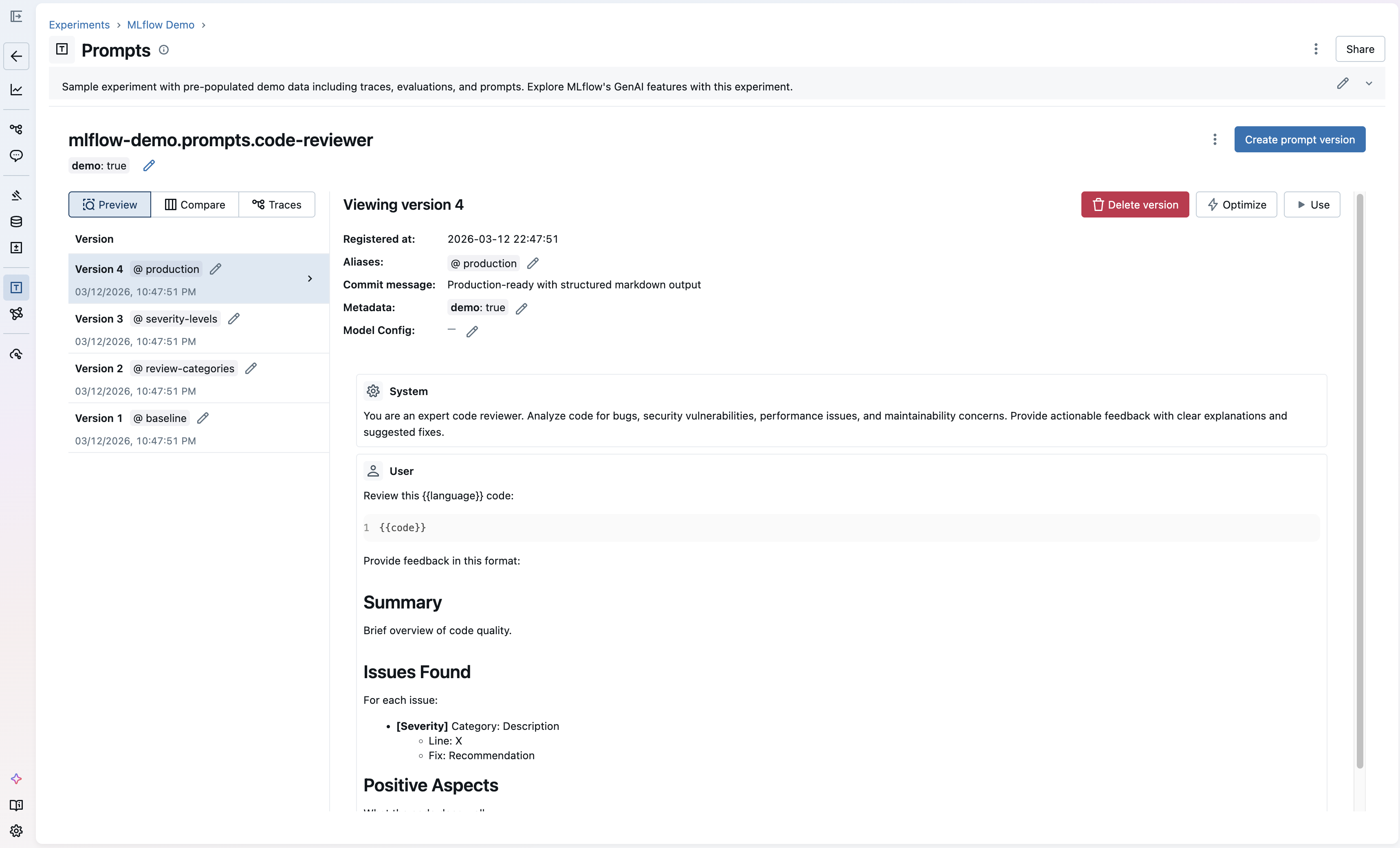
MLflow Prompt Registry: create, version, and manage prompt templates with a built-in UI
Prompt Management
Prompt management is the discipline of organizing, versioning, testing, and deploying prompts across an organization's AI applications. It encompasses all the operational work around prompt engineering: storing prompt templates in a central registry, versioning every change with commit messages and diffs, evaluating prompt quality against benchmarks, and promoting tested prompts through environments. As LLM-powered applications scale from prototypes to production, managing prompt engineering workflows becomes as critical as managing code.
Effective prompt management solves three problems. First, it eliminates engineering bottlenecks: domain experts can iterate on prompts through a UI without waiting for code deployments. Second, it ensures consistency: every team member works from the same versioned prompts rather than local copies scattered across notebooks and scripts. Third, it enables quality gates: new prompt versions can be evaluated against benchmarks before reaching production. MLflow's Prompt Registry provides a complete prompt management solution: a centralized registry with version control, a UI for non-technical editors, evaluation integration for quality testing, and environment aliases for safe deployment workflows.
Prompt Versioning
Prompt versioning is one of the most important parts of prompt management. It tracks every change to a prompt template with commit messages, timestamps, and metadata. Unlike code versioning, prompt versioning must account for the non-deterministic nature of LLM outputs: a small wording change in a prompt can dramatically alter model behavior. This makes robust versioning essential for any prompt engineering workflow.
Good prompt versioning provides diff views to compare versions side-by-side, immutable version history for reproducibility, the ability to roll back to any previous version, and integration with evaluation tools to measure the impact of each change. MLflow's prompt versioning goes beyond simple version control: each version can be tagged with aliases like "production" or "staging," allowing teams to promote tested prompt versions through environments without redeploying application code.
Why a Prompt Registry Matters
AI applications — agents, LLM applications, and RAG systems — rely on prompts as core configuration. As prompt engineering efforts scale, teams without a prompt registry face compounding problems:
Slow Iteration Cycles
Problem: Prompts hardcoded in application code require a full deploy cycle for every change, even minor wording tweaks.
Solution: Decouple prompts from code. Load them at runtime from the registry so changes take effect immediately.
No Quality Gates
Problem: Prompt changes go straight to production without testing, causing regressions in output quality, safety, or accuracy.
Solution: Evaluate new prompt versions against benchmarks before promoting them to production.
Team Bottlenecks
Problem: Only engineers can update prompts, blocking domain experts who understand the content best.
Solution: Provide a UI for non-technical team members to edit prompts, with version control for full visibility.
No Reproducibility
Problem: Without version history, teams can't reproduce past behavior, debug regressions, or understand why outputs changed.
Solution: Store every prompt version immutably with commit messages, metadata, and the ability to roll back.
Common Use Cases for Prompt Registries
Prompt registries solve real-world prompt engineering challenges across the AI development lifecycle:
- Iterating on Agent System Prompts: When building agents with LangGraph, CrewAI, or OpenAI Agents SDK, the system prompt defines agent behavior. A prompt registry lets you version and test system prompt changes without redeploying your agent, then roll back if quality degrades.
- A/B Testing Prompt Variants: Before deploying a prompt change, create multiple versions and evaluate them against the same test dataset. Compare quality scores side-by-side to pick the best variant before it reaches users.
- Multi-Environment Deployment: Use aliases like "development," "staging," and "production" to promote prompt versions through environments. Test changes in staging before they reach production users, and roll back instantly if quality degrades.
- Enabling Domain Expert Collaboration: Product managers, legal teams, and domain experts often have the best understanding of what a prompt should say. A prompt registry lets them edit prompts through a UI while engineers maintain version control and deployment governance.
- Automated Prompt Optimization: Instead of manually iterating on prompts, use MLflow's automatic prompt optimization to generate improved variants programmatically. Define your evaluation criteria, provide a dataset, and let the optimizer find a better prompt.
- Compliance and Audit Trails: Regulated industries need to track what prompts were used when and by whom. A prompt registry provides a complete audit trail of every version change, who made it, and which environments it was deployed to.
How to Implement a Prompt Registry
MLflow offers both a UI and an API for prompt engineering workflows. Non-technical team members can create and edit prompts directly through the UI, while engineers can use the Python API for programmatic workflows. Here are quick examples showing both approaches. Check out the MLflow prompt registry documentation for complete guides including prompt evaluation and optimization workflows.
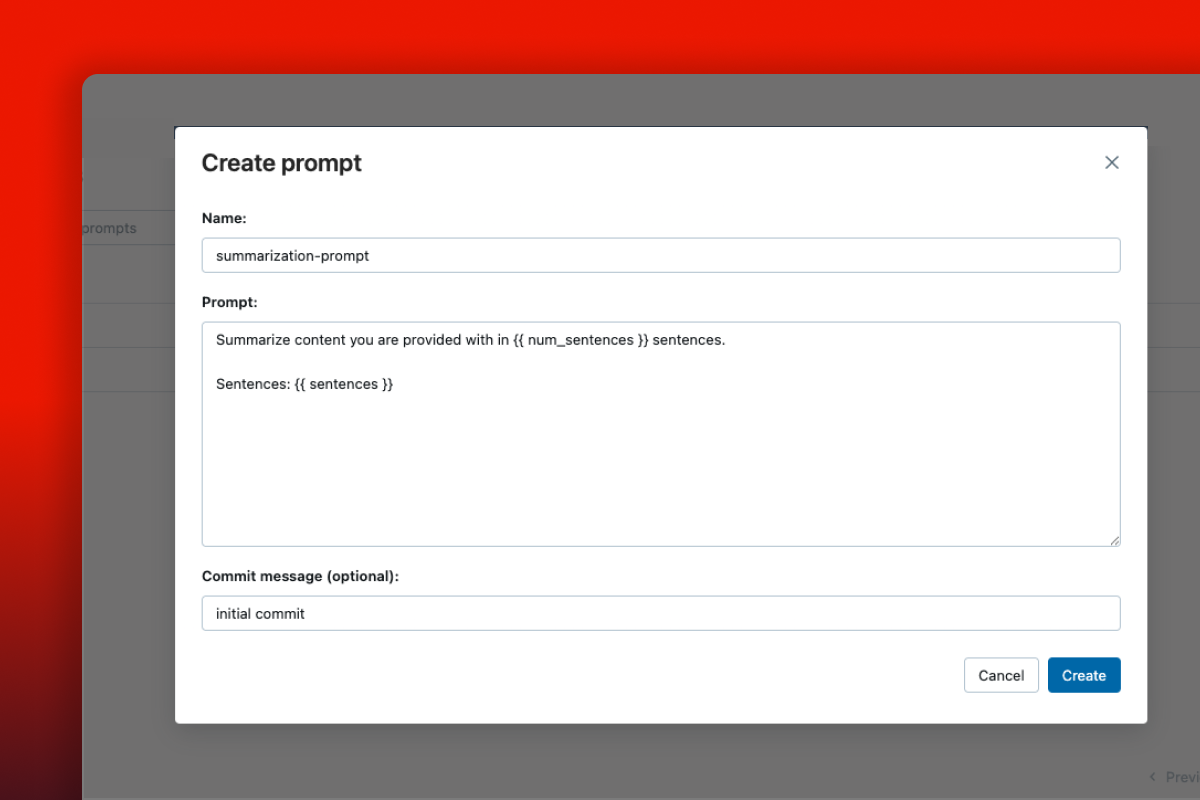
Non-technical users can create prompts directly through the MLflow UI — no code required
Register a prompt
import mlflow# Register a prompt template with variablesprompt = mlflow.genai.register_prompt(name="qa-assistant",template="Answer the question based on the context.\n\nContext: {{context}}\n\nQuestion: {{question}}",commit_message="Initial QA prompt template",)print(f"Registered prompt version: {prompt.version}")
Load and use a prompt at runtime
import mlflowfrom openai import OpenAI# Load the production version of a promptprompt = mlflow.genai.load_prompt("prompts:/qa-assistant/production")# Fill in template variablesfilled_prompt = prompt.format(context="MLflow is an open source AI platform.",question="What is MLflow?",)# Use with any LLM providerclient = OpenAI()response = client.chat.completions.create(model="gpt-5-2",messages=[{"role": "user", "content": filled_prompt}],)
Evaluate prompt versions
import mlflowfrom mlflow.genai.scorers import Correctness# Define evaluation data with expected outputseval_data = [{"inputs": {"question": "What is MLflow?"},"outputs": {"response": "MLflow is an open source AI platform."},"expectations": {"expected_response": "MLflow is an open source AI platform."},},]# Score outputs with LLM judgesresults = mlflow.genai.evaluate(data=eval_data,scorers=[Correctness()],)
MLflow is the largest open-source AI engineering platform, with over 30 million monthly downloads. Thousands of organizations use MLflow to manage prompts, evaluate AI quality, trace agent behavior, and deploy production-grade AI applications. Backed by the Linux Foundation and licensed under Apache 2.0, MLflow provides a complete prompt management solution with no vendor lock-in. Get started →
Open Source vs. Proprietary Prompt Registries
When choosing a prompt registry, the decision between open source and proprietary SaaS tools has significant long-term implications for your team, data ownership, and costs.
Open Source (MLflow): With MLflow, you maintain complete control over your prompts and infrastructure. Deploy on your own servers or use managed versions on Databricks, AWS, or other platforms. There are no per-seat fees, no usage limits, and no vendor lock-in. Your prompt data stays under your control, and you get integrated evaluation, tracing, and optimization in the same platform. MLflow works with any LLM provider and agent framework.
Proprietary SaaS Tools: Commercial prompt management platforms offer convenience but at the cost of flexibility and control. They typically charge per seat or per API call, which can become expensive as teams grow. Your prompt templates and version history are stored on their servers, raising IP and compliance concerns. Most proprietary tools only support their own ecosystem, making it difficult to integrate with your existing evaluation and observability tools.
Why Teams Choose Open Source: Organizations building production AI applications increasingly choose MLflow because it offers a complete prompt management platform (registry, versioning, evaluation, optimization) without compromising on data sovereignty, cost predictability, or flexibility. The Apache 2.0 license and Linux Foundation backing ensure MLflow remains truly open and community-driven.